How to use Trader.AI in ChatGPT
Trader.AI is a ChatGPT plugin. Install it once, and ChatGPT can turn any trading idea you describe into exact rules, backtest those rules on historical MetaTrader 5 data and show you the result without leaving the chat. This guide covers the install, the first conversation and what to do with the result. It takes about ten minutes.
What you need
- A ChatGPT account. Free, Plus and Pro all work, on chatgpt.com and in the ChatGPT apps.
- A Trader.AI account. You create it the first time ChatGPT asks you to sign in, and the Free plan includes 20 backtests a month.
You don't need an API key, a broker account or any code.
Step 1: Install the plugin
Open the Trader.AI plugin page in ChatGPT and click Try in chat. If you'd rather find it yourself, open Plugins in the ChatGPT sidebar and search for Trader.AI.
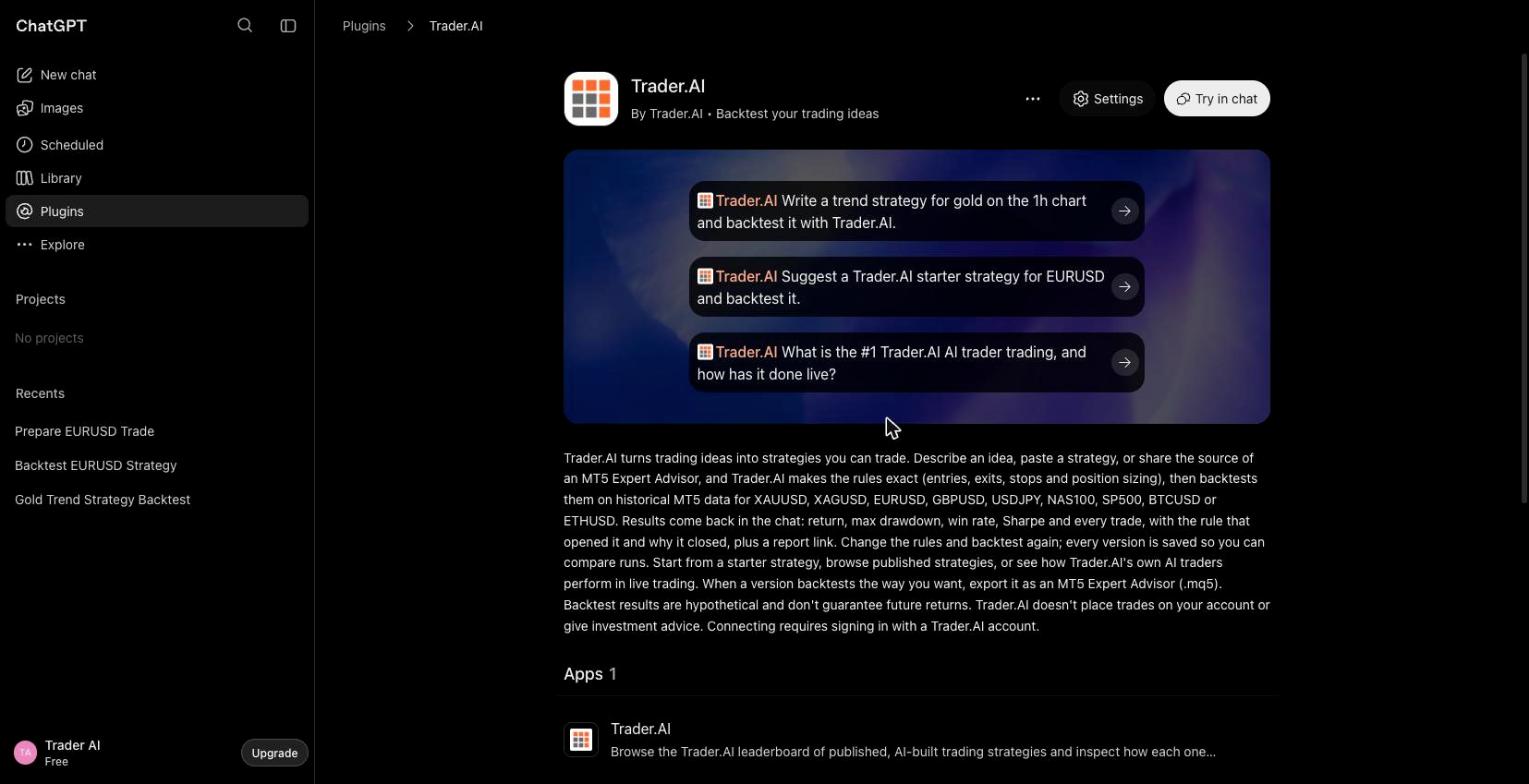
If you're on a ChatGPT Business or Enterprise workspace, your admin can also add Trader.AI as a custom MCP server. For everyone else, the plugin is the way in.
Step 2: Connect your Trader.AI account
The first time you use it, ChatGPT asks to connect Trader.AI. Click Connect, sign in (or create a free account) and you're back in the chat. You only do this once. You can check or change the connected account later under Settings → Plugins → Trader.AI.
Step 3: Describe the idea the way you'd tell a friend
Start a new chat, make sure Trader.AI is enabled, and describe the strategy in plain language. You don't need every detail; Trader.AI asks for anything it can't test without.
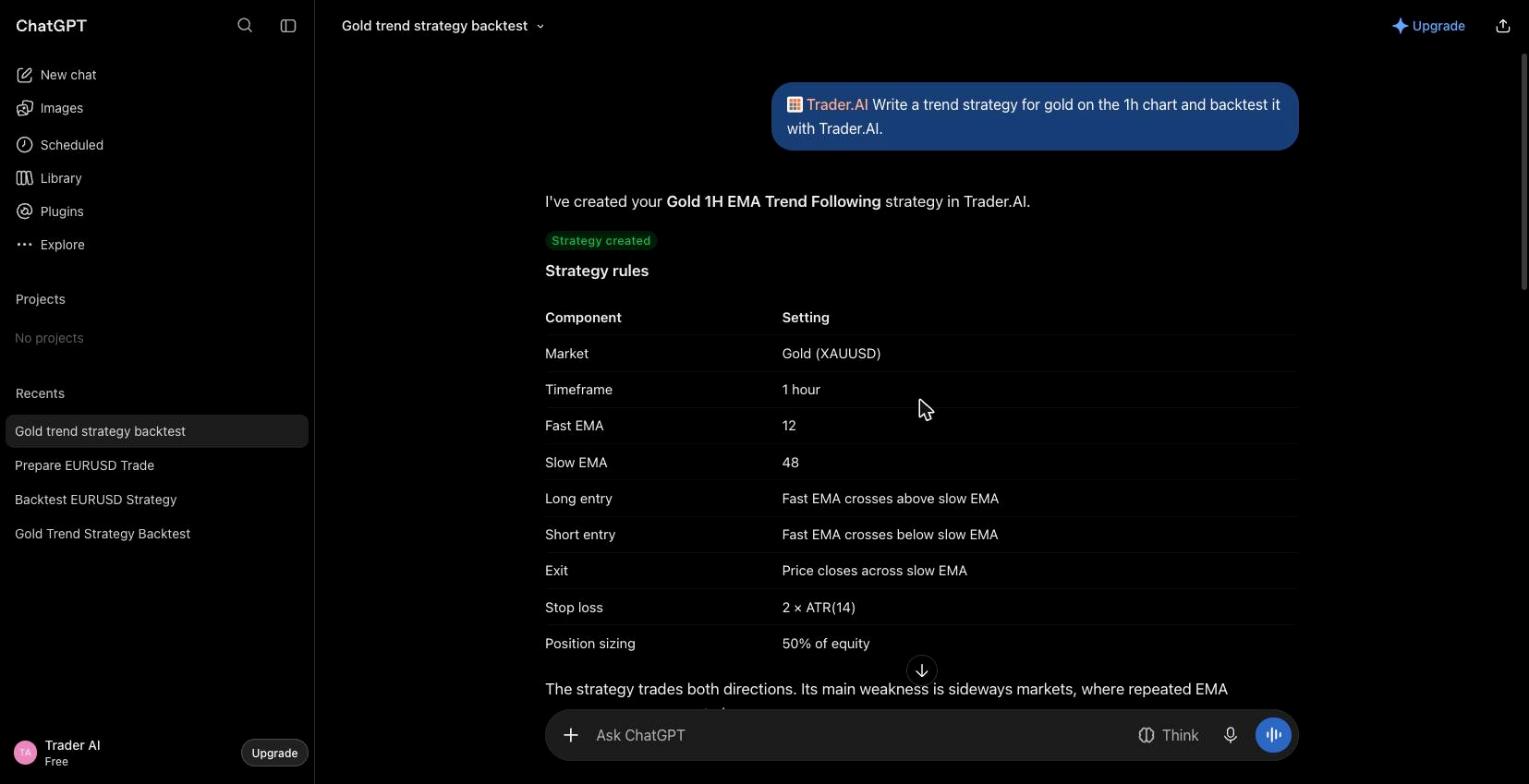
Use Trader.AI to write a trend-following strategy for gold on the 1-hour chart and backtest it over the last year.
Trader.AI turns the idea into exact rules: which direction it trades, the entry conditions, the exit conditions, the stop and the position sizing. ChatGPT shows you those rules in the chat, so you can see exactly what was tested. When the idea leaves real gaps, ChatGPT asks before building; when it doesn't, it builds a sensible first version and tells you what it chose.
Step 4: Read the result
A backtest on a year of 1-hour data takes under a minute. ChatGPT comes back with the headline numbers and a link to the full report on trader.ai:
- Return and ending equity
- Max drawdown, the worst peak-to-trough fall along the way
- Trades, win rate, average win and loss, profit factor
Look at drawdown before return. A strategy that made 8% while falling 4% along the way is a different thing from one that made 8% while falling 20%. Then open the report: it lists every trade with the rule that opened it and the reason it closed, so you can see whether the result came from a steady edge or two lucky trades.
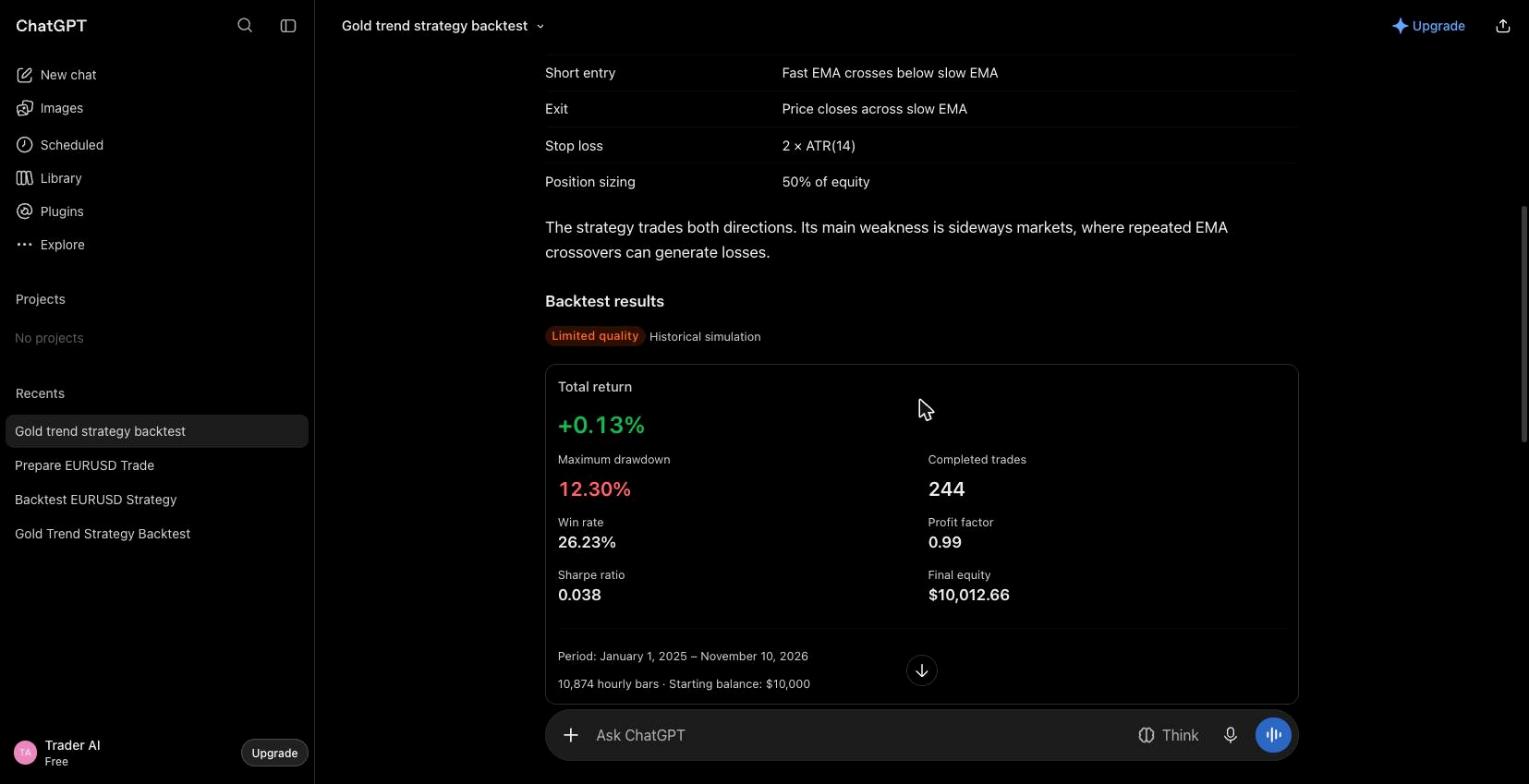
The run above is a real one: a 12/48 EMA crossover on gold, long and short, January 2025 to November 2026. It came back at +0.13% with a 12.3% drawdown over 244 trades, which is ChatGPT's polite way of saying it doesn't work. That's a useful result. Here is the report.
Prefer to watch it? The whole flow, from first prompt to exported Expert Advisor, is in this unedited walkthrough.
Step 5: Change one thing and run it again
This is where the plugin is most useful. Ask for one change at a time:
Move the stop to 1× ATR and backtest again.
Compare this version with the previous one.
Where did that backtest lose money? List the ten worst trades.
Every version and every run is saved to your Trader.AI dashboard, so you can go back to the one that held up best instead of the one you remember.
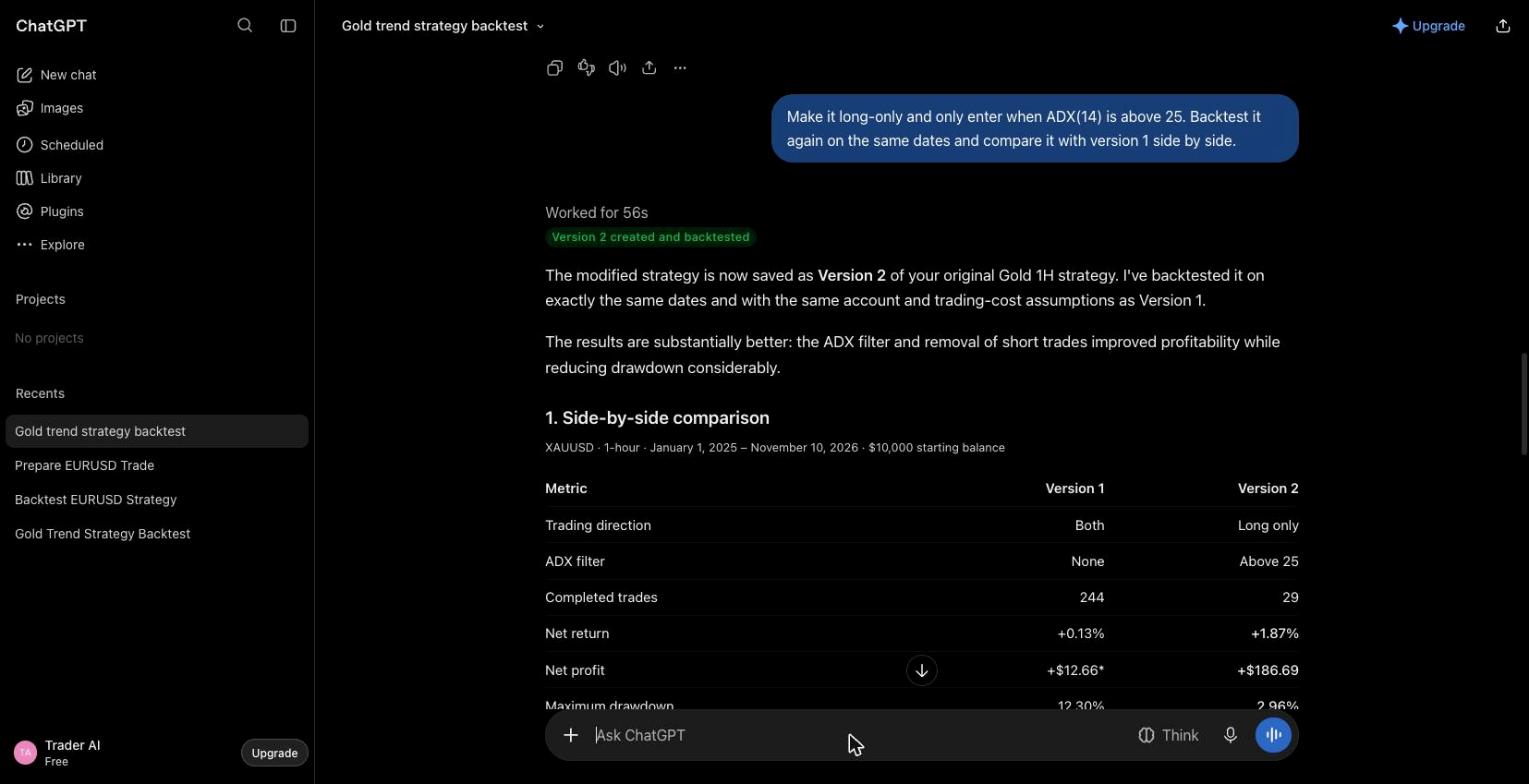
For the gold strategy above, one change was enough to learn something: long-only, and only enter when ADX(14) is above 25. Same dates, same costs. Version 2 made +1.87% with a 2.96% drawdown over 29 trades and a profit factor of 1.43, against 0.99 for version 1. Still a small sample, still zero costs, but now a candidate worth working on. Version 2 report.
Step 6: Take it to MT5 (Pro)
When a version is worth running, say "Export it as an MT5 Expert Advisor." Trader.AI builds the EA from the exact rules you tested and gives you a download link. Install it in your own MetaTrader 5 terminal and run it on a demo account first.
What Trader.AI won't do
It doesn't place trades, doesn't connect to your broker and doesn't give personal investment advice. Ask it to buy gold and it tells you it can't. Backtest results are hypothetical: they show how the rules would have traded on past data, not what they'll do next.
Good first prompts
- "Use Trader.AI to backtest a 20/50 EMA crossover on EURUSD, 15-minute chart, since January 2025."
- "Use Trader.AI to turn this idea into a strategy and test it: buy BTCUSD when it breaks the previous day's high, stop below the previous day's low, take profit at 2R."
- "Show me the Trader.AI leaderboard and backtest a version of the top strategy on the 4-hour chart."
Frequently Asked Questions
Does Trader.AI work on ChatGPT Free?
Yes. The plugin works on Free, Plus and Pro. Your Trader.AI account has its own plan: Free includes 20 backtests a month, Pro includes 200 plus parameter search and MT5 export.
Does ChatGPT run the backtest?
No. ChatGPT handles the conversation. Trader.AI turns the strategy into exact rules, runs it on historical MT5 data and sends the results back to the chat.
Which markets can I backtest?
EURUSD, GBPUSD, AUDUSD, XAUUSD, XAGUSD, NAS100, SP500, USOIL, BTCUSD and ETHUSD, on eight timeframes from 1 minute to 1 week. History starts in January 2025 and is being extended.
Can I use the same strategies in Claude or Gemini?
Yes. Trader.AI is an MCP server, so the same account and the same saved strategies work from Claude, Gemini, Grok, Cursor and other MCP clients. Setup steps for each are on the MCP page.
Related Resources